Support Hub
How can we help?
16 complete answers from the DSA guides, collected in one place.
16 results
How do I restart the car screen?
Park the vehicle safely before restarting the screen.
- Models: J8Press the volume knob inward
On J8 models, press the volume knob inward on the center console to restart the car screen.
- All models except: J8Press and hold the star button
Press and hold the star button on the steering wheel for at least 20 seconds.
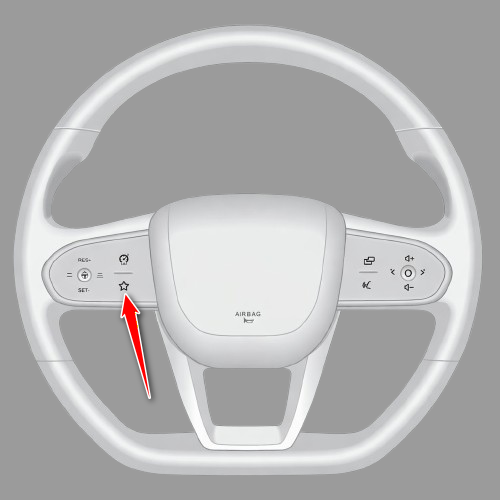
- All models except: J8Wait for the screen to restart
Release the button when the screen turns off, then wait for the car screen and DSA to load again.
Some instructions are hidden for the selected model.
Driver profile settings are missing
For example: Energy management does not appear even though your car is a plug-in hybrid.
- Open the information window
Open Driver Settings and tap the information icon in the top corner.
- Open the developer menu
Tap Current version quickly 10 times until the developer menu opens.
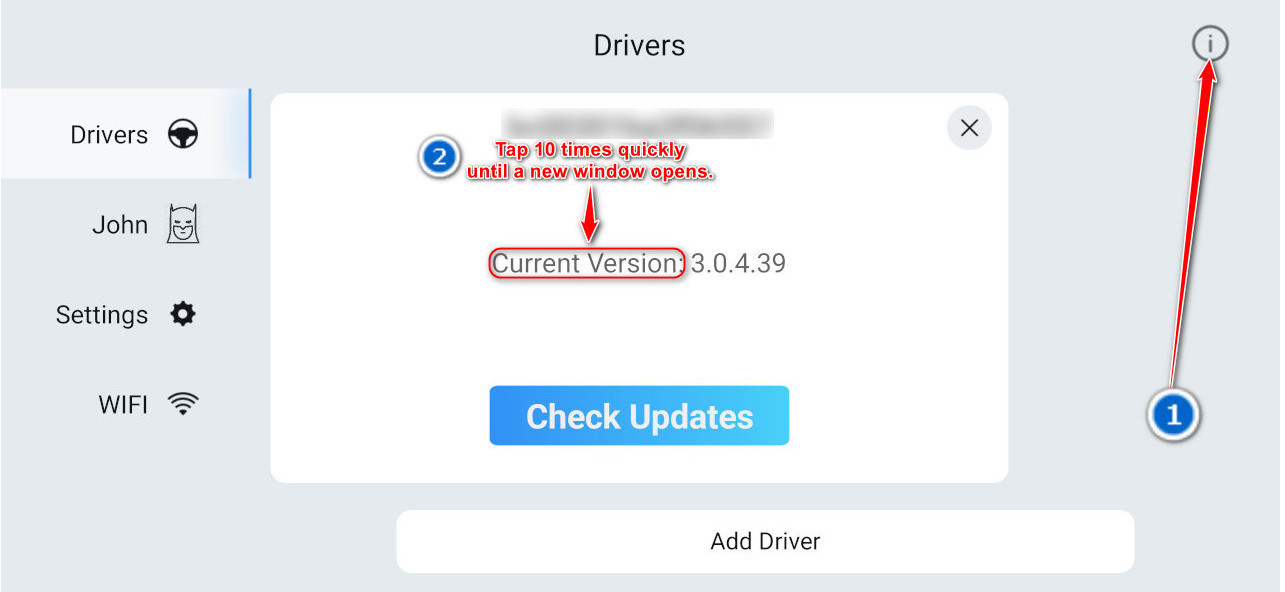
Tap the information icon, then tap Current version 10 times quickly. - Review the selected car features
Make sure only features physically installed in the car are selected.

Review the selected car features in the developer menu.
Some instructions are hidden for the selected model.
What should I do if an app freezes?
Close the frozen app from Recent apps, then open it again.
- Open Recent apps
By default, swipe up with two fingers. If you changed the assignments, use the gesture assigned to Recent apps.
Two fingers up - Find the frozen app
Find the app that is not responding in the Recent apps list.
- Close the app
Swipe the app card off the screen, or tap Close or X if that control appears.
- Open the app again
Return to the app list and open the app again.
Some instructions are hidden for the selected model.

Turn off media audio for the car Bluetooth connection so WhatsApp voice messages play through the phone.
- Open the phone Bluetooth settings
On the phone, open Settings and choose Bluetooth or Connected devices.
- Open the car Bluetooth connection
Find the car Bluetooth connection by the vehicle name, then open its connection settings.
- Turn off media audio
Turn off Media audio or Media streaming. WhatsApp voice messages will then play through the phone.
Some instructions are hidden for the selected model.
How do I turn on internet automatically?
Set the phone to turn on its personal hotspot when it connects to the car Bluetooth.
Samsung#
- Open Modes and Routines
Open Settings, choose Modes and Routines, open Routines, and create a new routine.
- Choose the car connection
Under If, choose Bluetooth device connected and select the car.
- Turn on Mobile Hotspot
Under Then, choose Mobile Hotspot, set it to On, and save the routine.
- Turn it off after the drive
If your phone offers Reverse actions when the routine ends, enable it so the hotspot turns off after Bluetooth disconnects.
iPhone#
- Create a Bluetooth automation
Open Shortcuts, choose Automation, create a new automation, and select Bluetooth.
- Choose the car
Select the car Bluetooth connection, choose Is Connected, and select Run Immediately.
- Turn on Personal Hotspot
Add the Set Personal Hotspot action, set it to On, and save the automation.
- Check hotspot availability
Personal Hotspot must already be enabled by your mobile carrier and configured in iPhone Settings.
Some instructions are hidden for the selected model.
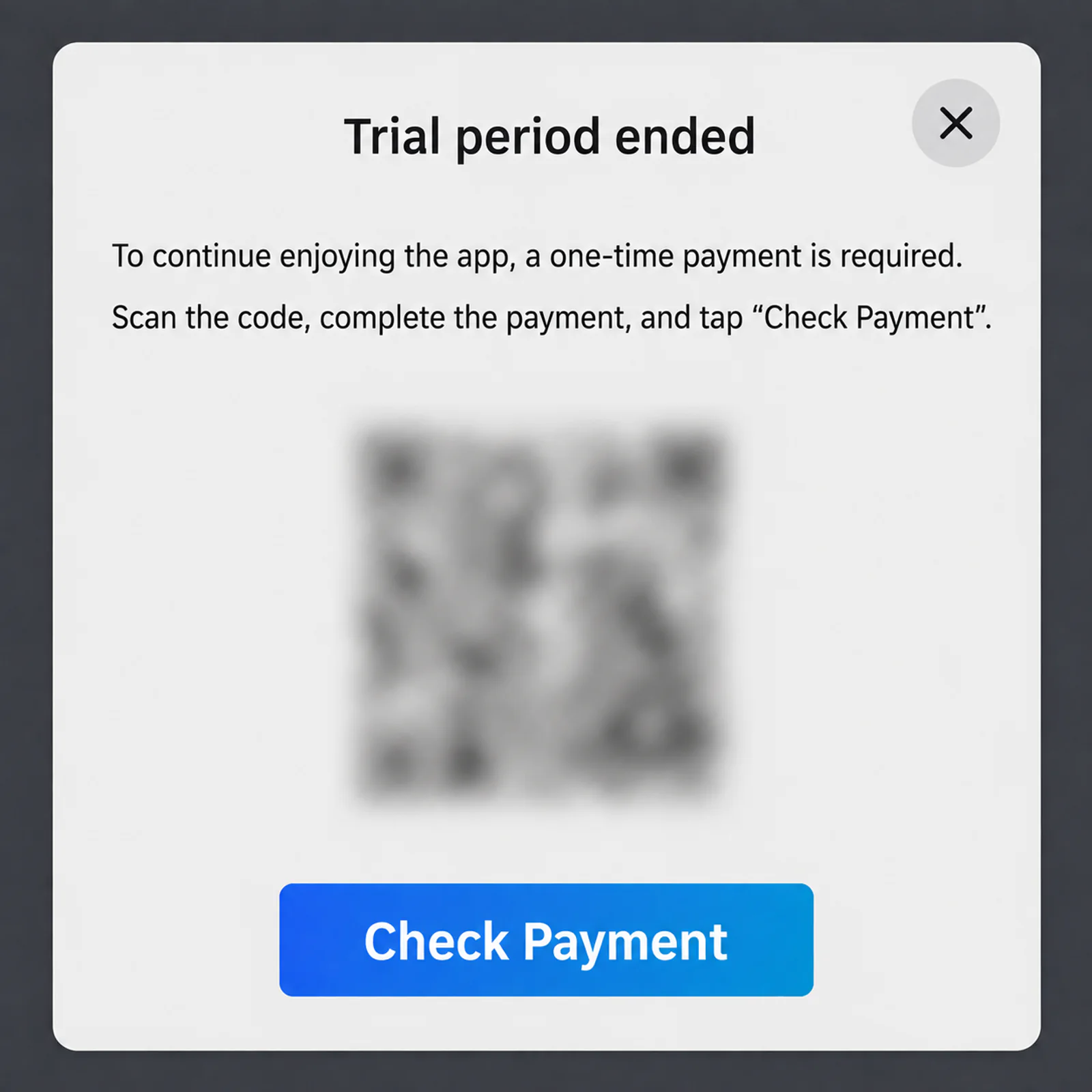
The payment message is not enabled by default. It can appear only after one hour of use when no active license is detected.
An internet connection is required to verify the license. If you already purchased a license, connect the car screen to the internet so DSA can verify it.
Some instructions are hidden for the selected model.
Disable Android Auto from the phone settings when you do not want it to start or connect in the car.
To use Android Auto again later, repeat the same steps and tap Enable at the bottom of the app information screen.
- Open Apps in the phone settings
Open Settings on the phone, then choose Apps or Applications.
- Find Android Auto
Use the app search and open Android Auto.
- Tap Disable and confirm
Tap Disable at the bottom of the app information screen, then confirm the message.
Some instructions are hidden for the selected model.
How do I check whether GPS is working?
Park the vehicle outdoors in an open area before testing the GPS.
Do not judge GPS reception indoors or in covered parking. If the data remains empty outdoors after several minutes, contact support.
- Open the Engineer menu
Use the Engineer menu guide for your vehicle model, then return here.
Engineer menu for this model - Open GPS Information
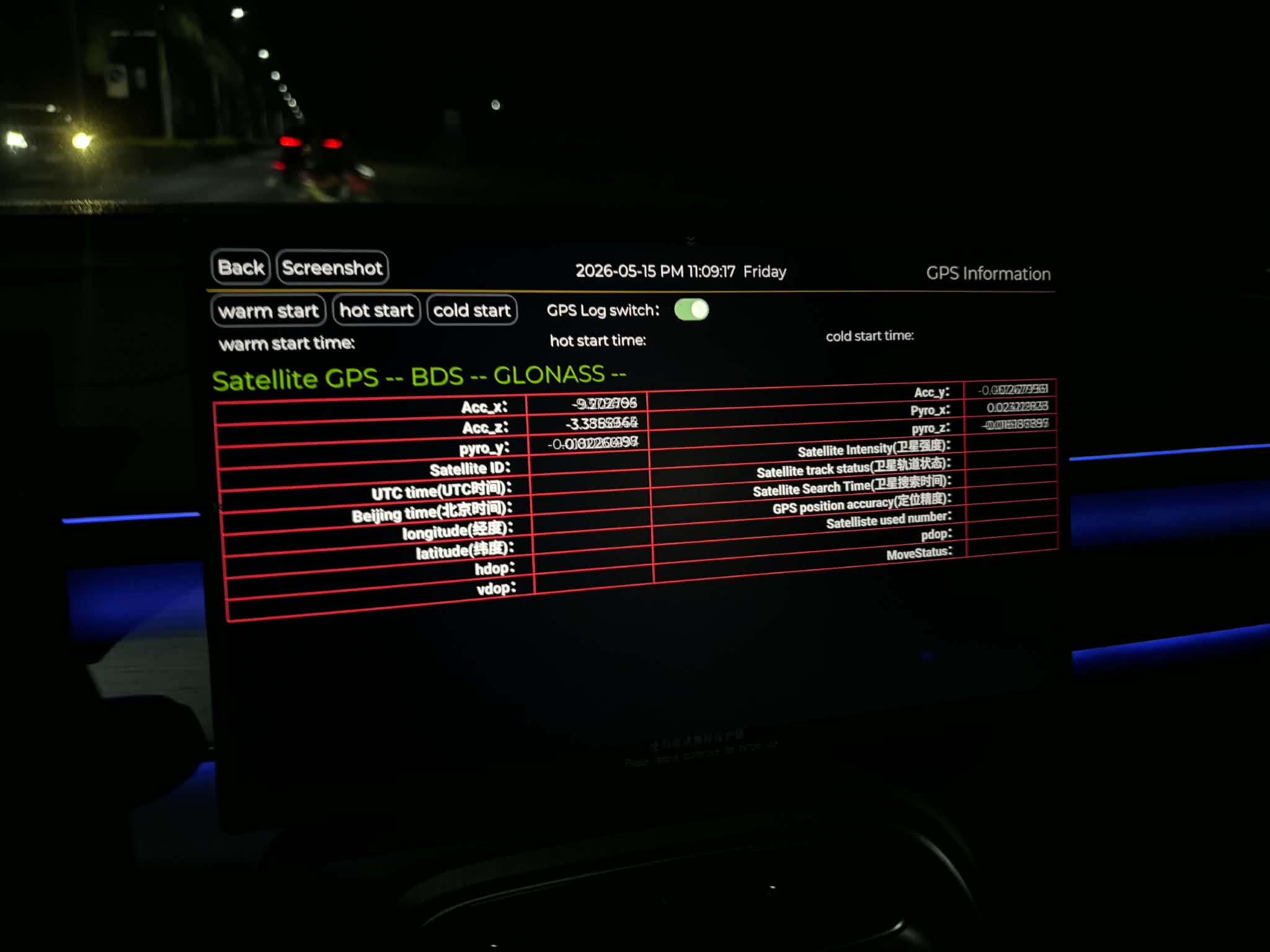
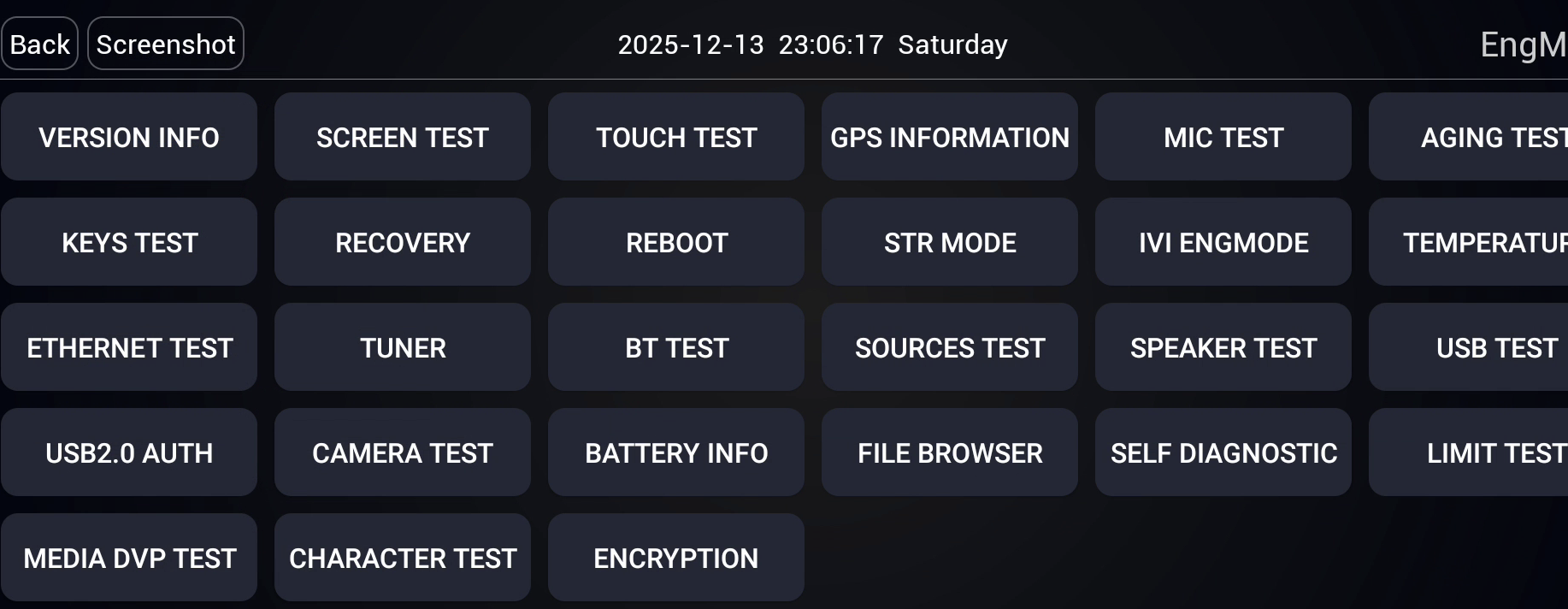
Tap GPS in the engineer menu to open the GPS Information screen.
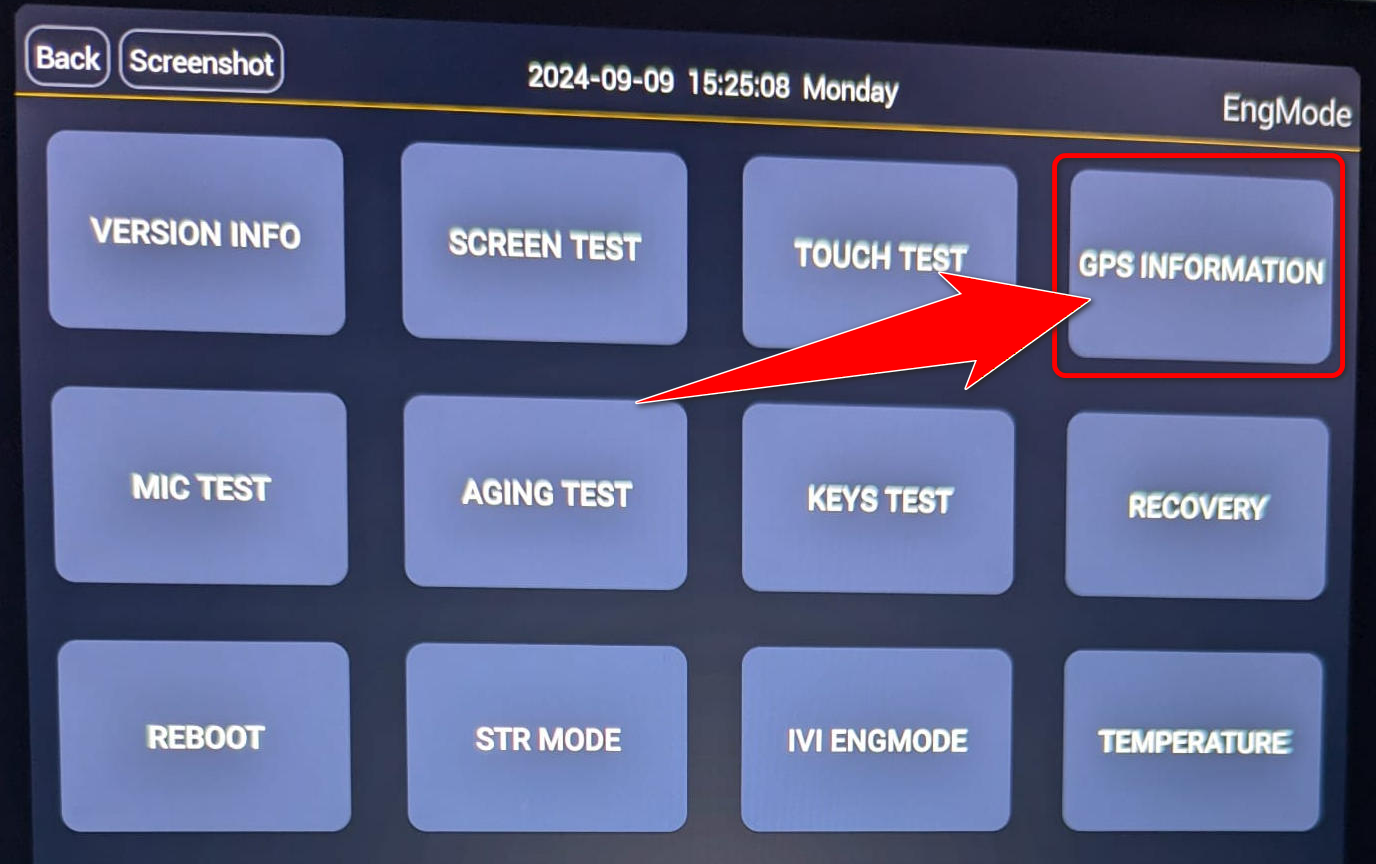
Tap GPS INFORMATION in the Engineer menu. - Check the satellite data
Wait several minutes. Working GPS shows satellite IDs, tracking status, location, time, and values that continue updating. If the fields stay empty and GPS, BDS, and GLONASS remain --, the system is not receiving a satellite fix.
Some instructions are hidden for the selected model.
How do I turn caller name announcements on or off?
This setting controls whether the system says the caller name during an incoming call.
- Open the sound settings
Open the vehicle settings and choose Sound. On some software versions, this option appears under Bluetooth or Phone.
- Change the caller announcement setting
Find Caller name announcement or Incoming call announcement, then turn it on or off.
- Allow contact access
To announce a saved name, allow the car system to sync contacts from the connected phone.
Some instructions are hidden for the selected model.
Grant permissions
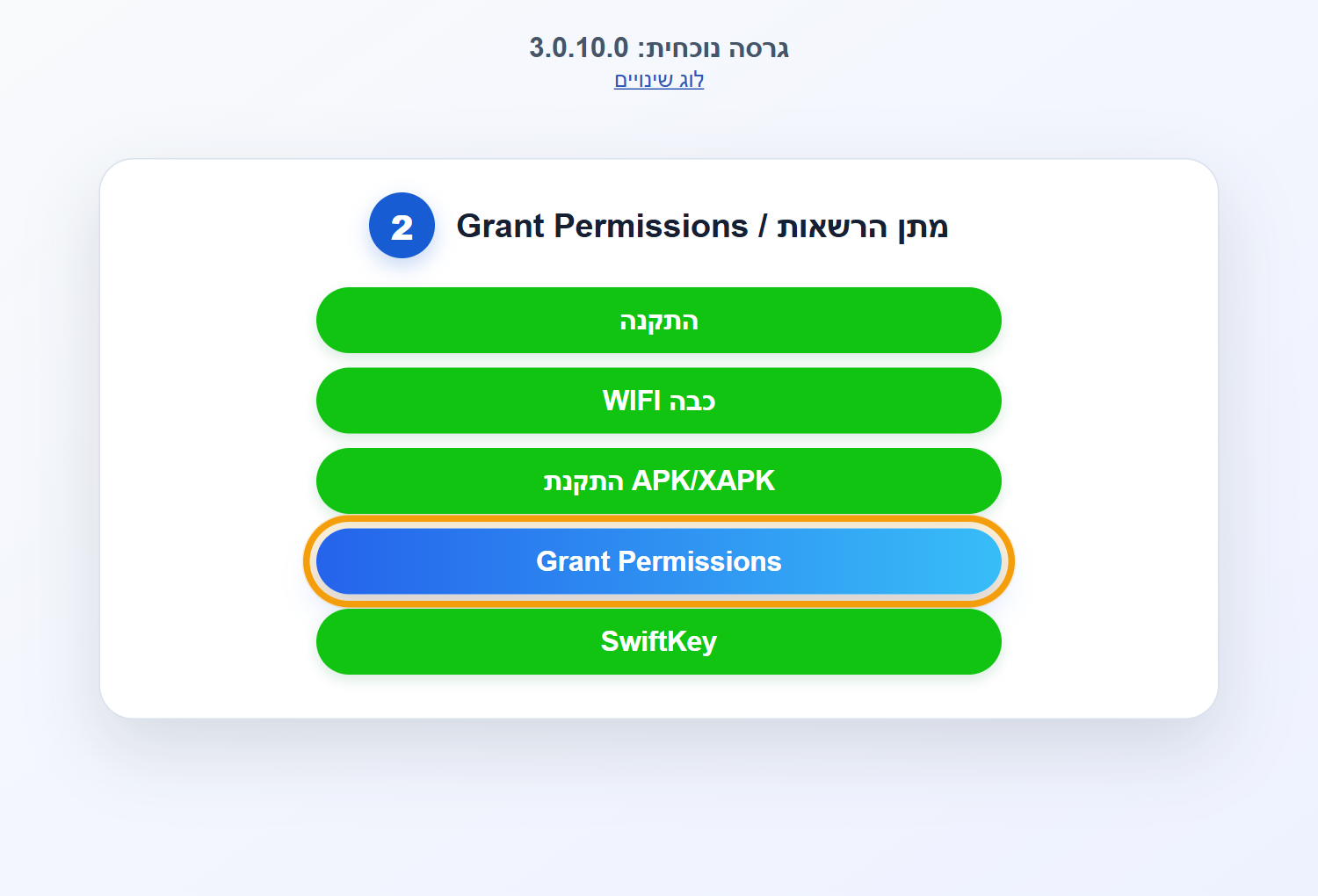
Use the installation website to grant the permissions required by DSA.
- Open the website
Open jaecoo-apps.store in the browser and sign in.
- Choose Grant Permissions
After signing in, select Grant Permissions / מתן הרשאות and follow the on-screen instructions.
Some instructions are hidden for the selected model.
How do I assign a key to a driver?
If “Current key” does not appear, exit the car, lock it, and unlock it. It will then appear.
Not needed if you only have one driver profile.
Some instructions are hidden for the selected model.
Engineer menu
The Engineer menu belongs to the vehicle multimedia system. It is separate from the DSA Developer menu.
Open this menu only when a guide or support representative asks you to. Do not change settings you do not understand.
O9
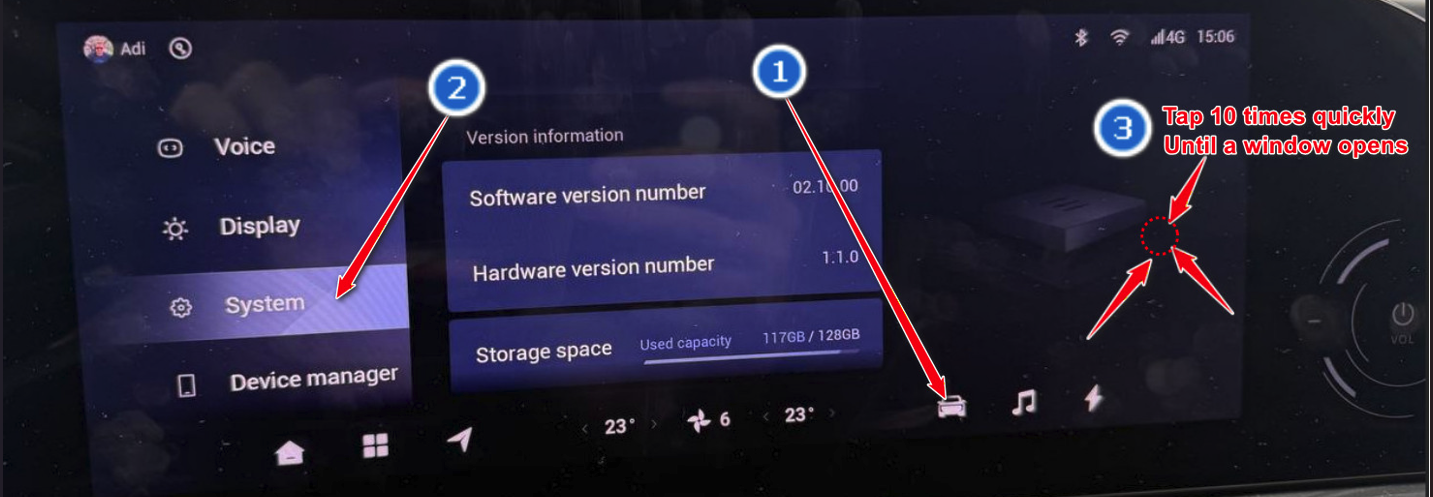
Models: O9- Open the vehicle settings
Tap the vehicle icon to open the vehicle settings.
- Choose System
Open the System page in the settings menu.
- Open the Engineer menu
Tap the marked point quickly 10 times until a new window opens.
T8 / T9
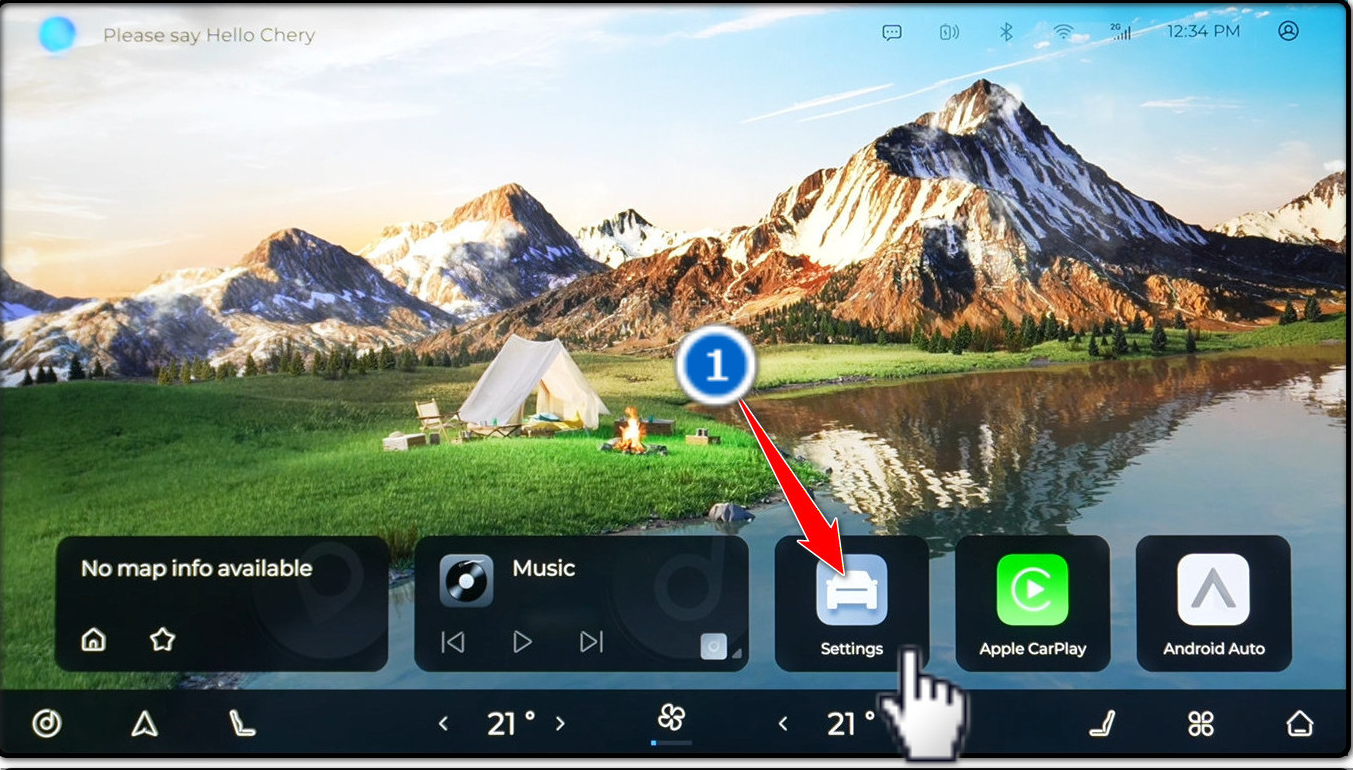
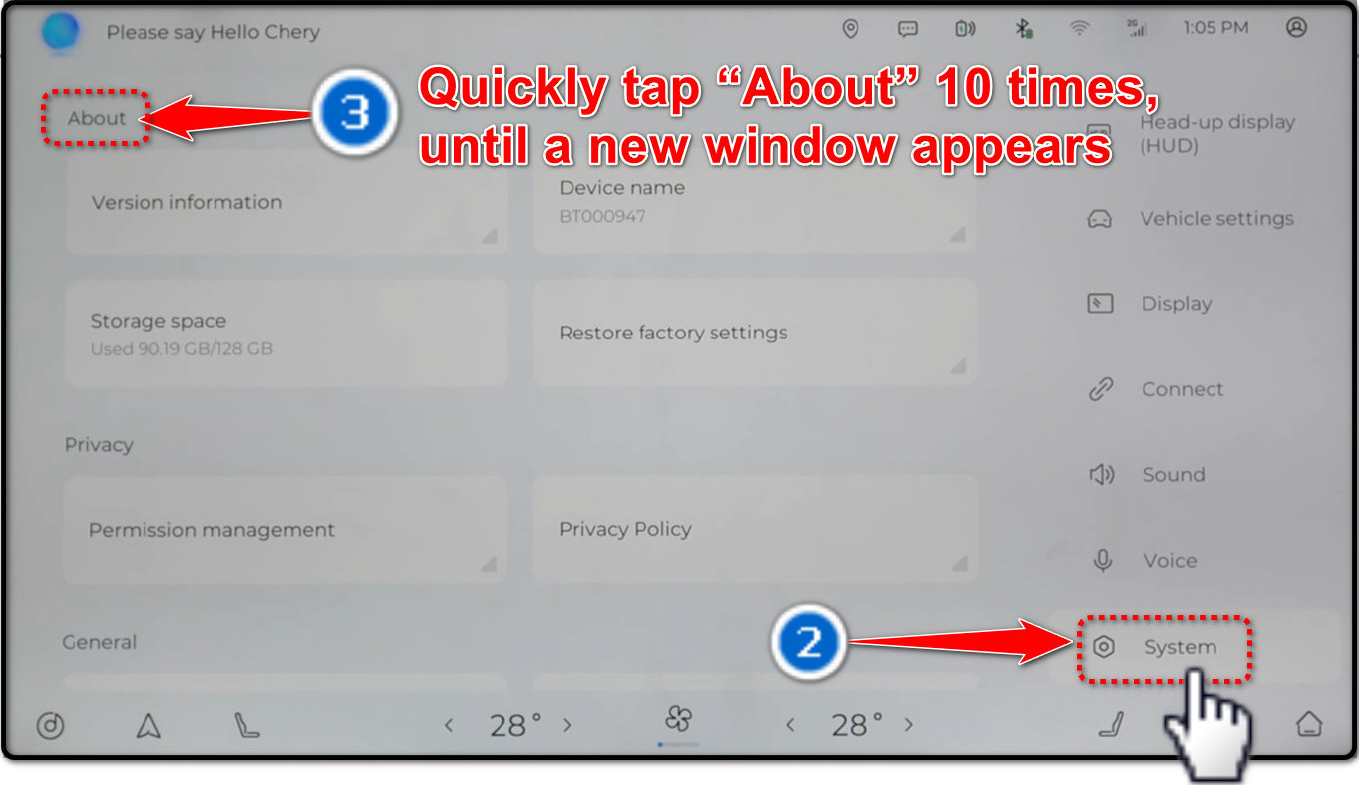
Models: T8, T9- Open Settings
Open the Settings app from the multimedia home screen.
- Choose System
Select System in the settings menu.
- Open the Engineer menu
Tap About quickly 10 times until a new window opens.
J5 / J7
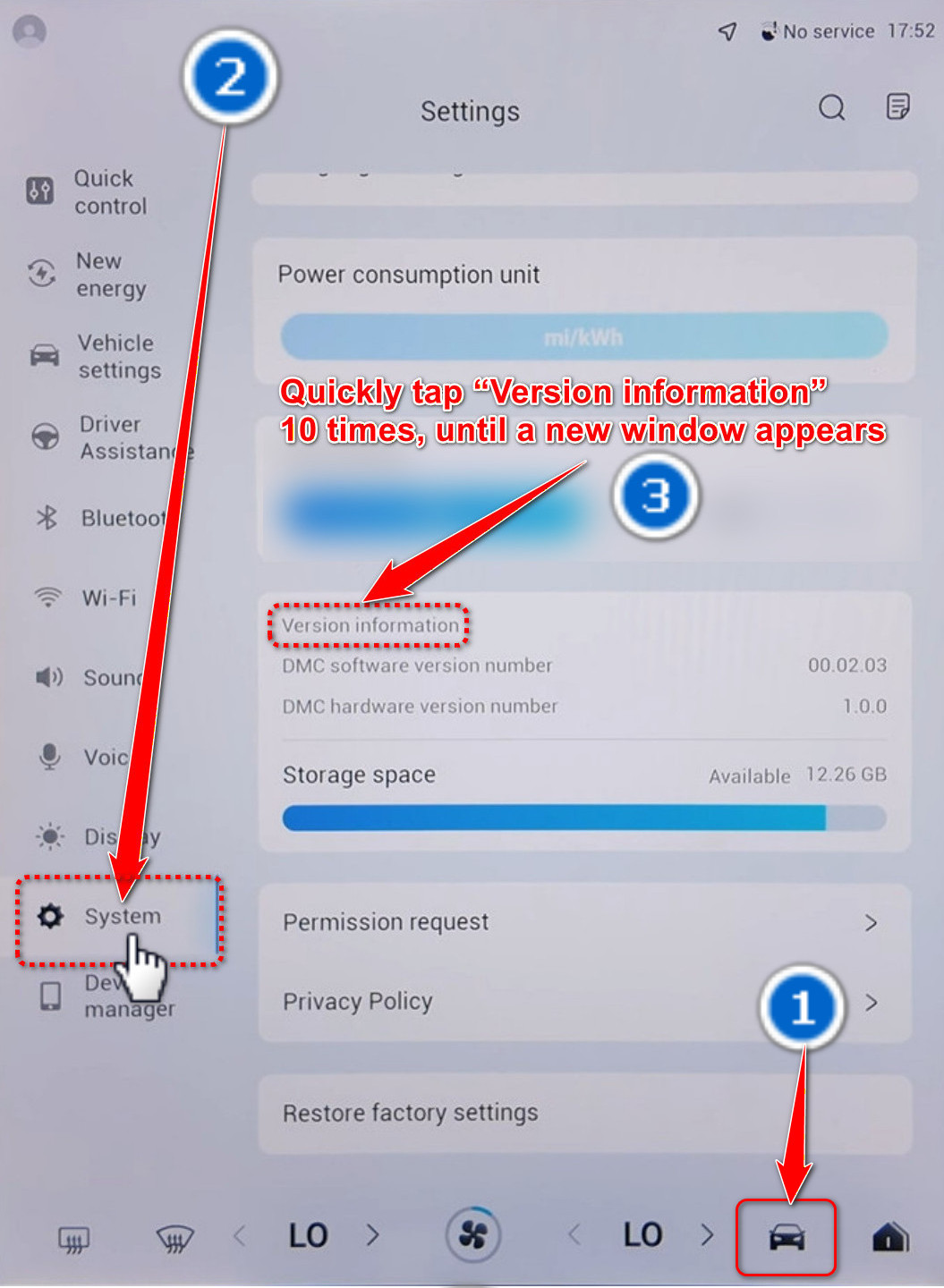
Models: J5, J7- Open the vehicle settings
Tap the vehicle icon to open the vehicle settings.
- Choose System
Select System from the settings list.
- Open the Engineer menu
Tap Version information quickly 10 times until a new window opens.
Other models — narrow screen
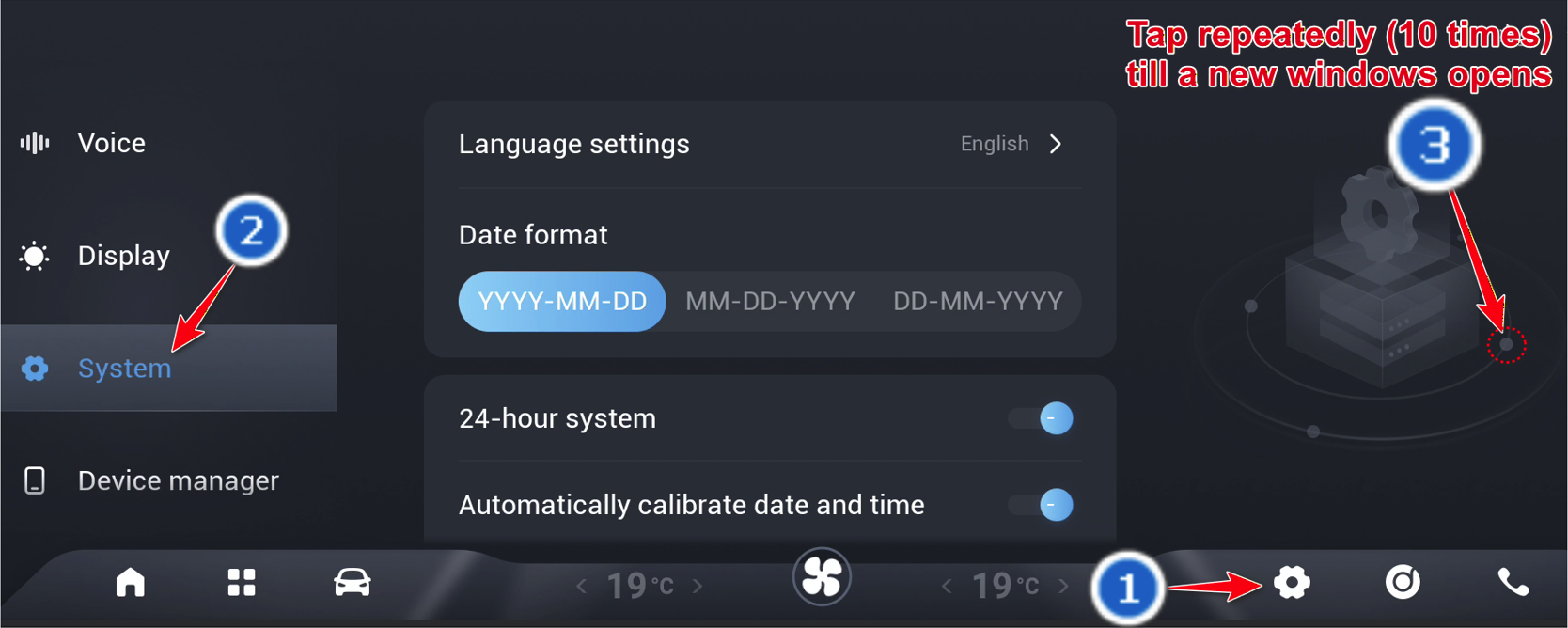
All models except: O9, T8, T9, J5, J7- Open the system settings
Open Settings from the bottom bar or open the app list and choose Local settings.
- Choose System
Select System in the settings menu.
- Open the Engineer menu
Tap the marked point quickly 10 times until a new window opens.
Some instructions are hidden for the selected model.
How many languages does Driver Settings support?
Driver Settings supports 10 languages: Hebrew, English, Russian, Spanish, Italian, Polish, Arabic, Romanian, French, and Greek.
Some instructions are hidden for the selected model.
Waze in the head-up display
Turn on Waze broadcast in Driver Settings to show Waze navigation information on the head-up display.
- Driver Settings
Open Driver Settings from the car app list.
- Settings
Choose Settings in Driver Settings.
- Waze broadcast
Find Waze broadcast and turn it on.
Some instructions are hidden for the selected model.
DVR360 recording: questions & answers
How does DVR360 recording work?
DVR360 uses the vehicle’s installed cameras to record a 360° view to USB storage. Enable it once; recording starts automatically each time you start the vehicle. Requires installed 360° cameras and a compatible USB flash drive.
Does DVR360 record while parked, or when someone approaches?
No. DVR360 records only while the vehicle is on. It does not record while parked or when someone approaches the vehicle.
Can DVR360 replace a dashcam?
An alternative to a dashcam for driving recordings. It does not provide recording while parked.
Does DVR360 record audio?
No. DVR360 records video without audio.
Where do I connect the USB drive, and where are recordings saved?
Recordings are saved only to the USB flash drive. Connect it to the USB port near the driver, usually the wider USB-A port.
Where can I watch recordings? Is there a phone app?
Watch on the vehicle’s screen while stopped. To view recordings elsewhere, use the USB drive with a computer or another device that can read it and play video. There is no phone app.
What USB capacity and format do I need?
Plug the drive into the USB port near the driver. In most vehicles this is the wider USB-A port. Use exFAT or NTFS; any capacity is supported and existing files can remain. At an average of 70MB per minute, a 32GB drive holds approximately 7 hours and 37 minutes. Actual available recording time depends on free space and recording usage. If you need to change the drive’s format, back up its files first: formatting erases them.
What happens when the USB drive fills up?
Older recordings are automatically deleted when the drive fills up.
How do I get DVR360?
Connect to Wi-Fi through Driver Settings, for example using your phone’s hotspot. Accept the update prompt, or tap ⓘ → Check for updates. DVR360 is available in version 4.0.0.0. Enable the recording option in Driver Settings. Recording will start automatically every time you start the vehicle. Recordings are saved only to the USB flash drive.
No answers found. Try another term or clear the filters.